firstly if u have no time:
TL;DR
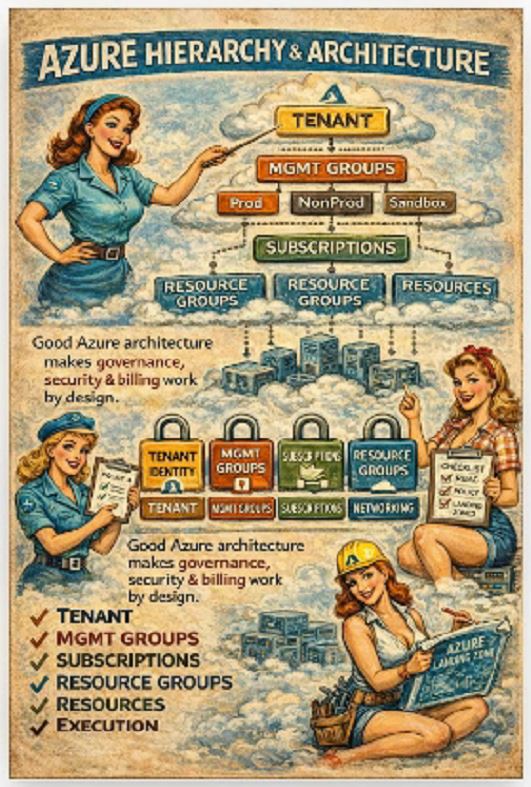
Azure = hierarchical control plane
Tenant = identity
Management Groups = governance
Subscriptions = isolation
Resource Groups = deployment scope
Resources = execution
Policy + RBAC + Locks = real control
Azure is not flat. It is a layered model where authorization, policy and scope inheritance define behaviour.
At a technical level, everything is scoped like this:
Tenant → Management Group → Subscription → Resource Group → Resource
Each layer introduces:
RBAC inheritance
Azure Policy evaluation scope
Azure Blueprints / Landing Zone alignment
Logging and monitoring boundaries
Miss one layer, and your governance model becomes inconsistent.
🔹 Tenant (Microsoft Entra ID boundary)
The tenant is not just “login”.
It is the identity control plane.
Key technical components:
Azure AD (Entra ID) directory
Conditional Access policies
Identity Protection
Privileged Identity Management (PIM)
Cross-tenant access settings
This is where:
tokens are issued
claims are defined
authentication flows are enforced
👉 Every ARM request is authenticated against Entra ID.
No tenant control = no secure control plane.
🔹 Tenant Root Management Group
This is the top-level policy evaluation scope.
Everything below inherits from here.
Typical use cases:
Global deny policies
Security baseline enforcement
Allowed locations / SKUs
Mandatory tagging
Example:
“if”: {
“field”: “location”,
“notIn”: [“westeurope”, “northeurope”]
},
“then”: {
“effect”: “deny”
}
}
Applied at root → affects every subscription automatically.
👉 This is how enterprises enforce standards without relying on humans.
🔹 Management Groups (governance segmentation)
This is where architecture becomes operational.
Management Groups allow:
policy inheritance
RBAC scoping
environment separation
Typical structure:
├── Platform
├── Landing Zones
│ ├── Prod
│ ├── NonProd
│ └── Sandbox
Technical implications:
Policies assigned here cascade down
RBAC roles assigned here apply to all child scopes
Azure Policy initiatives (policy sets) are usually bound here
👉 This is the layer where Landing Zone architecture lives.
🔹 Subscriptions (isolation + quota boundary)
Subscriptions are not just billing units.
They are hard isolation boundaries for:
quotas (CPU, storage, networking)
RBAC scopes
policy assignments
resource provider registration
Key technical aspects:
Each subscription has its own:
resource provider namespace registrations
limits (vCPU quotas, etc.)
activity logs
Example:
👉 If you forget this in a new subscription, deployments fail. Quietly.
Best practice:
separate Prod / NonProd
separate workloads (e.g. data vs app)
separate high-risk environments
🔹 Resource Groups (deployment boundary)
This is where ARM actually operates.
Resource Groups define:
deployment scope for ARM/Bicep
lifecycle boundary (delete RG → delete all resources)
lock scope (CanNotDelete / ReadOnly)
Example deployment:
–resource-group rg-app-prod \
–template-file main.bicep
Important nuance:
RBAC at RG level overrides inheritance
Policies are evaluated at RG scope if assigned
👉 This is not architecture. This is execution scope.
🔹 Resources (data plane vs control plane)
Each resource has:
Control plane (ARM API)
Data plane (service-specific API)
Example:
Azure Storage:
Control plane → create storage account
Data plane → read/write blobs
This matters because:
RBAC ≠ Data access
You may have:
Contributor role (control plane)
but no access to actual data
👉 This is where many security assumptions break.
Policy + RBAC + Locks (the real governance engine)
Azure governance is built on three pillars:
1. Azure RBAC (who can do what)
Role assignments:
–assignee user@company.com \
–role Contributor \
–scope /subscriptions/xxx
Inheritance:
Assigned at MG → applies to all subscriptions below
2. Azure Policy (what is allowed)
Policy effects:
deny
audit
append
deployIfNotExists
Example:
Enforce tagging:
“effect”: “deny”,
“field”: “tags[‘environment’]”,
“exists”: “false”
}
3. Resource Locks (prevent accidents)
–name “DoNotDelete” \
–lock-type CanNotDelete \
–resource-group rg-prod
👉 Together, these define:
who can deploy
what they can deploy
and whether it can be removed
What breaks without proper architecture
From real-world environments:
everything in one subscription
no management groups
policies applied inconsistently
RBAC assigned directly to users
Result:
no least privilege
no governance at scale
manual enforcement
audit failures
cost chaos
Landing Zones (the missing piece most ignore)
Modern Azure architecture is built on Landing Zones.
They define:
network topology (hub-spoke)
identity integration
policy baseline
subscription vending
Key components:
Hub VNet (shared services)
Spoke VNets (workloads)
Azure Firewall / NVA
Private Endpoints
DNS zones
👉 This is where architecture becomes infrastructure.
Final thought
Knowing how to deploy Azure services makes you useful.
Understanding:
RBAC inheritance
policy evaluation
scope hierarchy
landing zone design
makes you someone who can actually run Azure at scale.
Because in enterprise environments:
bad architecture does not fail immediately
it fails slowly
expensively
and usually during an audit or an incident
)))))))))