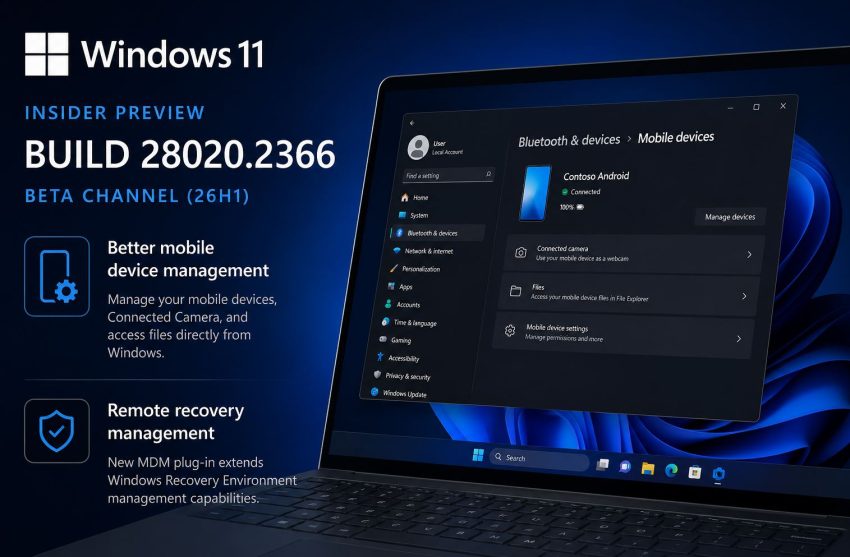
Microsoft has released Windows 11 Insider Preview Build 28020.2366 for the Beta (26H1) channel. This is not one of those feature packed Insider releases with a long list of UI changes. Instead, it focuses on polishing existing functionality and preparing the platform for future capabilities.
Although the changelog is short, there are a couple of improvements worth looking at.
Mobile device management moves further into Windows
The biggest visible change in this build is an updated Mobile Devices page in Settings.
Users can now manage connected phones directly from:
Settings > Bluetooth & devices > Mobile devices
From this page Windows can:
- manage connected mobile devices
- configure Connected Camera
- access files stored on supported phones through File Explorer
Microsoft has been steadily moving toward tighter Windows and mobile integration. Features such as Phone Link already allow notifications, messaging, calls and application streaming. This update continues that direction by making device management easier to discover and centralizing related settings.
For organizations that deploy Windows endpoints, this also makes the experience more consistent for users who regularly switch between desktop and mobile workflows.
Better support for remote recovery
Another important change targets enterprise administrators rather than end users.
Build 28020.2366 introduces a new remote recovery management plug in that extends Windows Recovery Environment management capabilities for MDM providers.
While most home users will never notice this feature, it is significant for organizations managing large fleets of Windows devices.
Remote recovery capabilities can help administrators:
- automate recovery operations
- simplify troubleshooting
- reduce hands on support
- improve recovery consistency across managed devices
As more organizations rely on cloud based endpoint management, recovery features become just as important as deployment and patch management.
Mostly stability improvements
Apart from these additions, Microsoft describes this release as containing only a small number of bug fixes and quality improvements.
That usually indicates the development branch is entering a stabilization phase rather than introducing major user facing features.
This is fairly typical for Beta channel releases, where Microsoft focuses on validating existing functionality before wider deployment.
What this means for Windows 11 26H1
Version 26H1 is a little different from previous Windows feature updates.
Unlike traditional annual releases, Microsoft positions 26H1 primarily as a platform update that supports new hardware generations, particularly upcoming Qualcomm Snapdragon X2 based devices. New user features continue to arrive gradually through Insider builds rather than appearing all at once in a single release.
That explains why many recent Insider builds have focused on incremental improvements instead of dramatic interface redesigns.
Microsoft specific recommendations
If your organization participates in the Windows Insider Program, Build 28020.2366 is worth deploying to a small pilot group.
Pay particular attention to:
- Mobile Devices management
- Phone Link integration
- Connected Camera functionality
- MDM recovery workflows
- File Explorer access to mobile devices
Organizations using Microsoft Intune or other MDM platforms should also evaluate the new remote recovery management capabilities as Microsoft continues expanding cloud based device management.
General recommendations
Even if you are not using Microsoft technologies, this release highlights a broader industry trend.
Modern desktop operating systems are increasingly treating smartphones as native extensions of the PC rather than separate devices.
IT teams should expect future endpoint management solutions to include:
- deeper mobile integration
- centralized device management
- cloud based recovery
- seamless cross device file access
- unified identity driven experiences
Preparing for these workflows today can reduce future migration effort regardless of which endpoint management platform your organization uses.
Final thoughts
Build 28020.2366 will probably not attract much attention because it introduces only a handful of visible changes. Still, these are the kinds of improvements that gradually make Windows easier to manage and better integrated with modern device ecosystems.
Microsoft continues investing in mobile integration and enterprise management rather than chasing flashy interface changes. For IT administrators, those incremental improvements often deliver more long term value than headline features.
Windows 11, Windows Insider, Windows 11 Beta, Windows 11 26H1, Microsoft Intune, MDM, Windows Recovery Environment, Phone Link, Connected Camera, Enterprise IT