Engineering Roadmap for 2026. Hard-edged. Technical. No sugar-coating.
0. Prologue: “Accelerating AI is easy. Doing it securely is an elite sport.”
Almost every organisation today is doing three things:
-
Stuffing “smart” features everywhere.
-
Giving Copilot to anyone with a pulse.
-
Trying to stretch Zero Trust over LLMs the same way they stretched VPNs over the cloud in 2014.
The result?
-
chaos in the data estate
-
AI-driven leaks
-
uncontrolled permission sprawl
-
zero visibility
-
AI agents that “go wherever they fancy”
And Microsoft politely says, in the Ignite/Build tone:
“You must secure AI before you accelerate AI.”
But the honest version is far sharper:
“If you accelerate AI without security — you accelerate your own death.”
Let’s move to the roadmap.
1. Architectural Model 2026: The AI Security Layer Cake
To accelerate AI without killing your company, you need a five-layer security architecture.
Here it is — in ASCII, just how you like it:
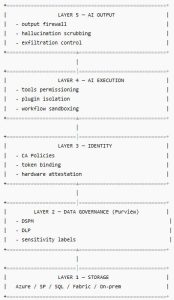
Each layer must be secured before AI even touches it.
2. Step 1 — Build the data map AI is allowed to see
AI sees everything the user sees (and often more — unless you restrict it).
So Step 1:
2.1. Implement Full Data Estate Discovery
Purview DSPM must scan:
-
SharePoint
-
OneDrive
-
Exchange attachments
-
SQL
-
Azure Data Lake
-
On-prem NAS/SMB
-
File servers
-
Git repositories
-
Confluence
-
ERP/CRM storage
And build a Data Map:
datasets → sensitivity → owners → access → lineage → risk
Why does this matter?
Because:
-
AI is the perfect hunter of sensitive data
-
It will find everything you forgot existed
-
It will correlate it semantically
-
It will surface it through summaries, tables, JSON
As Microsoft states in the MDDR:
“AI is extremely effective at discovering patterns that human operators overlook.”
Meaning: if you have a forgotten password in a 2019 document, Copilot will find it.
3. Step 2 — Establish the Data Sensitivity Foundation (Purview Labels)
AI does not understand “confidential”.
Purview does.
And Purview can pass that knowledge to the AI Security Plane.
3.1. Enable auto-labelling across all data
Auto-labelling must cover:
-
content
-
metadata
-
attachments
-
AI-generated output
-
derivative documents
-
tables
Minimum label set:
| Label | Meaning | Mandatory For |
|---|---|---|
| Public | may be shared | marketing |
| Internal | not external | all documents |
| Confidential | personal data, finance | HR/Finance |
| Highly Confidential | IP, secrets, source | R&D/Legal |
| Regulated | GDPR, HIPAA, PCI | healthcare, finance |
3.2. Turn on propagation
This is the crown jewel.
If Copilot reads a Confidential file,
→ the new output must also be Confidential.
Without propagation, AI will shred your security labels into confetti.
4. Step 3 — Deploy the AI Request Interception Layer
This is where it gets scientific.
Purview ARIL must evaluate every AI request:
-
what data the AI wants
-
from where
-
for what purpose
-
whether it has rights
-
whether the context matches
-
what the user is doing
-
what the token is doing
-
the risk level
-
whether output violates policies
Real log example:
Without this layer, AI outputs everything.
5. Step 4 — Deploy the Output Firewall (LLM Scrubbing Engine)
Protection from:
-
hallucination leakage
-
oversharing
-
data remix
-
sensitive inference
Output firewall performs:
-
masking
-
redaction
-
truncation
-
sensitivity filtering
-
PII/PHI removal
-
JSON sanitisation
-
table scrubbing
Example:
Request:
“Give me a summary of employee performance reports.”
Raw AI Output:
-
employee names
-
bonuses
-
complaints
-
termination plans
-
KPIs
Scrubbed Output:
-
aggregated KPIs
-
trends
-
general issues
-
anonymised data
Without output-firewall, Copilot = “leak-as-a-report”.
6. Step 5 — Identity, Token, and Access Hardening
Microsoft keeps repeating a brutal truth:
AI follows the token — not the human.
If the token is stolen, the AI becomes your enemy.
6.1. Enable Token Protection (Entra ID)
Bind the token to:
-
device
-
key
-
session
-
geolocation
-
network context
6.2. Enforce phishing-resistant MFA
FIDO2, Passkeys — non-negotiable.
6.3. Conditional Access with AI-context signals
CA must evaluate:
-
what the AI agent is doing
-
with which data
-
which product
-
sensitivity level
-
which tool is invoked
-
what the refresh token is doing
6.4. Session Attestation 2026
A quietly introduced new layer:
-
device integrity
-
context integrity
-
token integrity
7. Step 6 — Restrict AI Tools (Plugins, Tools, Skills)
The most dangerous thing is giving AI too many tools.
Mini-table:
| Tool | Risk | Allow? |
|---|---|---|
| SQL Query Tool | full DB access | read-only via proxy only |
| File Writer Tool | creates files | high leak risk → restrict |
| PowerShell Tool | RCE | deny |
| HTTP Tool | exfiltration | deny |
| Graph API Write | modifies objects | limited, controlled |
| Graph API Read | extracts everything | only with AI-DLP |
8. Step 7 — AI Agent Isolation & Sandboxing
Here comes the real R&D.
8.1. Execution Sandbox (Azure / Fabric)
AI agents must run in:
-
isolated containers
-
limited tokens
-
no full Graph access
-
memory sandbox
-
output size constraints
-
strict DLP
8.2. Tools-per-Agent Isolation
Each agent must have its own tools, not a global pool.
9. Step 8 — Deploy AI Behaviour Analytics
AI behaves differently from humans.
Purview + Defender analyse:
-
request patterns
-
data types
-
frequency
-
agent types
-
MITRE correlations
-
anomalies
-
“non-human-scale” behaviour
Example:
10. Step 9 — Shadow AI Discovery & Control
Shadow AI includes:
-
unauthorised models
-
custom LLMs
-
private endpoints
-
HuggingFace scripts
-
local agents on dev laptops
-
research servers
Purview AI Governance detects via:
-
port scans
-
network traffic
-
API logs
-
token patterns
-
anomaly signatures
11. Step 10 — Build the AI Security DevOps Pipeline
AI control must enter CI/CD.
Pipeline must include:
11.1. Prompt Tests
-
injection
-
harmful manipulation
-
cross-context extraction
11.2. Tool Access Tests
-
privilege boundaries
-
token misuse
-
RCE attempts
11.3. Model Behaviour Tests
-
hallucination leakage
-
sensitivity bypass
-
DLP evasion
11.4. Data Exposure Tests
-
synthetic PII injection
-
fuzzing
-
chain-of-thought leakage detection
12. Step 11 — Create the AI Incident Response Plan
Must include:
-
token rotation
-
plugin revocation
-
agent blocking
-
audit of all AI endpoints
-
temporary Data Lake isolation
-
lineage debugging
-
forensic output analysis
13. Step 12 — Enable AI Drift Detection
Models:
-
degrade
-
shift
-
lose sensitivity awareness
-
hallucinate more dangerously
-
bypass DLP unintentionally
Monitor:
-
leak frequency
-
error types
-
response length
-
“too precise” answers (danger!)
-
pattern anomalies
14. Step 13 — Governance-as-Code (GaaC)
Purview + Entra + Defender policies must be IaC:
-
Terraform
-
Bicep
-
Pulumi
Why?
-
versioning
-
rollback
-
CI/CD
-
scalability
-
risk control
15. Step 14 — Security Telemetry Fusion
The strongest defence = correlation across:
-
Purview AI logs
-
Defender identity logs
-
Entra token logs
-
Microsoft Graph logs
-
endpoint telemetry
-
AI output samples
-
lineage graph
Fusion Engine identifies:
-
token replay
-
anomalous output
-
leaks
-
plugin-based attacks
-
prompt injection chains
16. Step 15 — Executive Reporting (AI Risk Posture Dashboard)
A 2026 CISO must see:
-
AI–data interaction heatmap
-
AI exposure score
-
DLP bypass attempts
-
token replay attempts
-
drift score
-
shadow AI detections
-
plugin risk scoring
-
classification trends
-
behavioural anomalies
Fabric + Purview + Defender deliver this.
Final Takeaway of CHAPTER 4:
“Accelerating AI is only possible once you’ve built the walls and the electric fence.”
AI without oversight → catastrophe.
AI with the right architecture → a business accelerator.
rgds,
Alex
… to be continued…